Xero Integration: Minimal Data Mode
Payments | Xero Integration: Minimal Data Mode
The Xero integration allows your platform to automatically synchronize user and supplier information into Xero for invoicing, reconciliation, and financial reporting. In many cases, organizations prefer to limit the amount of personal or contact data shared with external systems to reduce mismatches, avoid unnecessary updates, or comply with internal data‑handling policies.
To support this, the system provides a configuration option called Xero Minimal Data Mode. When enabled, this mode restricts the data sent to Xero to only the essential fields required for identifying a contact.
Setup Instructions
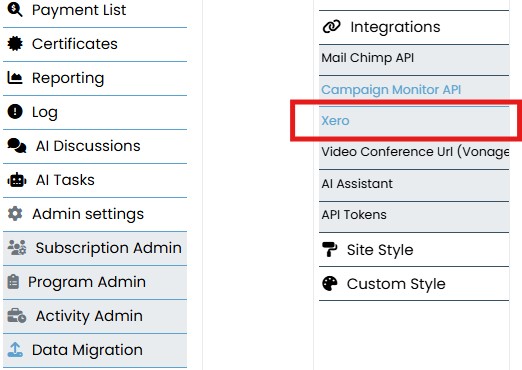
- Go to Admin Settings → Integrations → Xero.
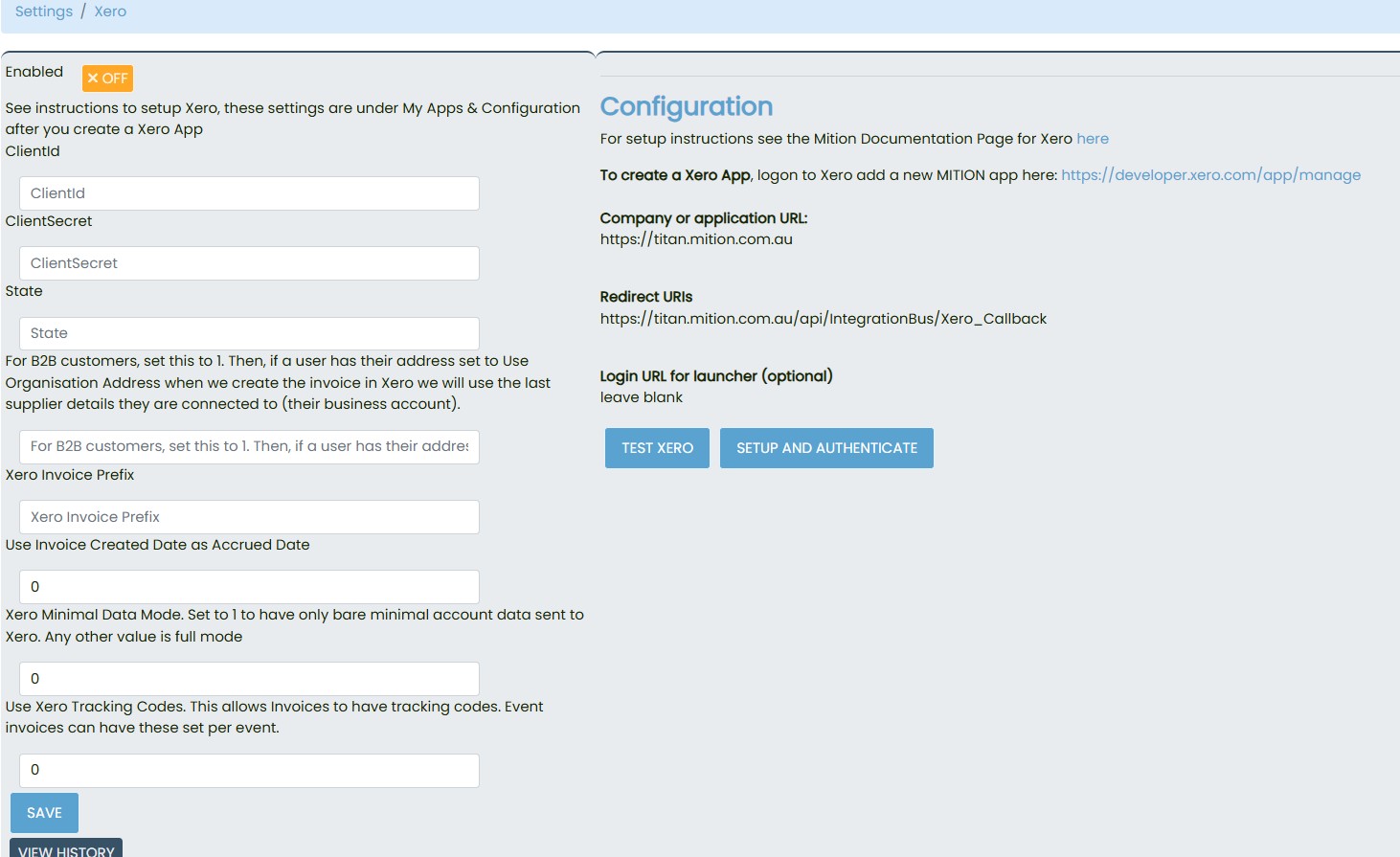
- Locate the field Xero Minimal Data Mode.
- Set the value to
1to enable minimal sync. - Click Save.
- If needed, re-authenticate your Xero connection using the Setup and Authenticate button.
Understanding Minimal Data Mode
Purpose
Minimal Data Mode is designed to:
- Reduce the amount of personal information sent to Xero.
- Prevent address and phone number mismatches between systems.
- Avoid unnecessary updates caused by minor profile changes.
- Keep Xero contact records clean and stable.
This mode is particularly useful when:
- Xero does not need full contact details for your workflow.
- Your organization prefers to maintain address and phone data only in the AMS.
- You want to avoid overwriting manually maintained Xero contact information.
Minimal Mode Enabled (Value = 1)
When Minimal Data Mode is set to 1, the system sends only the following fields to Xero:
- Name
- UserID / SupplierID (unique identifier)
Full Mode Enabled (Value = 0 or blank)
When Minimal Data Mode is not enabled, the system sends the full set of available contact information, including:
- Name
- UserID / SupplierID
- Address
- Phone numbers
- Any additional profile fields supported by the integration
This mode is appropriate when Xero is used as the primary source of truth for contact details.

How to Enable Minimal Data Mode
- Navigate to Admin Settings → Integrations → Xero.
- Locate the field labeled Xero Minimal Data Mode.
- Enter the value 1 to enable minimal data synchronization.
- Click Save.
- If required, re‑authenticate the Xero connection using the Setup and Authenticate button.
- Use the Test Xero button to confirm the integration is functioning correctly
The Xero Minimal Data Mode provides a flexible way to control how much contact information is shared with Xero. By limiting synchronization to essential fields, organizations can reduce data conflicts, maintain cleaner records, and streamline their integration workflow. Whether you choose minimal or full data sync, the configuration is simple to manage and can be adjusted to suit your operational needs.