Workflows- Auto Assign Roles and Subscriptions Based on Supplier Relationships
Knowledge Base | Workflows | Auto Assign Roles and Subscriptions Based on Supplier Relationships
This workflow enables automatic assignment of roles and subscriptions when a new member is added under a supplier organisation. It streamlines onboarding and ensures consistency across supplier-linked memberships.
To simplify and automate the setup of user access and entitlements based on supplier relationships.
- Workflow Step Name: Auto assign role and subscription
- Description: Automatically assigns the correct role and subscription when a supplier admin or staff adds a new member.
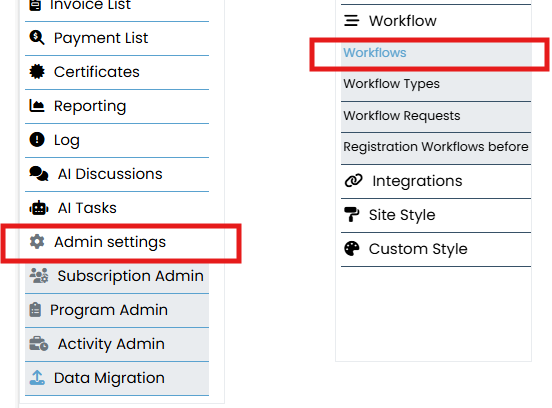
To begin, log in to the Mition admin dashboard. From the left-hand menu, scroll down and click on Admin Settings. In the submenu that appears, select Workflows. This section allows you to create, edit, and manage workflows
Click the New button to start building a workflow. In the setup form:
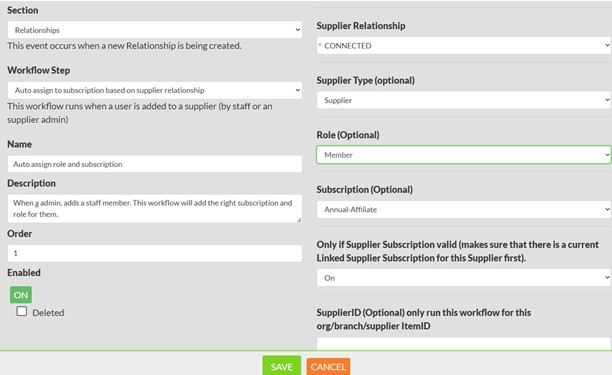
- Set the Section to something relevant, such as “Relationships”.
- Choose a Workflow Step like “Auto assign to subscription based on supplier relationship.”
- Enter a Name for the step, such as “Auto assign role and subscription.”
- In the Description, explain what the user should expect. For example: Assigns role and subscription when a member is added under a supplier.
- Optionally restrict the workflow to specific roles (e.g., Administrator, Member, Supplier).
- Set the Order to define when this step occurs in the sequence.
- Toggle the workflow Enabled to ON
Linked Supplier Subscription Check
Enable the Only if Supplier Subscription valid option to ensure the workflow only runs when a valid linked subscription exists for the supplier. This is ideal for bulk payers:
- Create a subscription type specifically for bulk-paying suppliers.
- Link this subscription to the supplier organisation.
- The workflow will verify this link before assigning roles and subscriptions.